How You Can Get Started with Writing Code with Python
A practical walkthrough for understanding Python, installing it, and getting started.
In this post you will learn what python is, how to install python, and why python is my favorite programming language.
What is Python
Python is a programming language created by a Dutch programmer, Guideo van Rossum. As with most amazing software, he made it as a hobby project to keep busy for fun since the office was closed. Even though that is pretty amazing by itself, more amazing is that he named it after Monty Python, the comedy group.
Python is also open source software, which means you can go look at the current code (as of writing, that lives : here at github.com/cpython. This is the CPython code, which means the C code that builds into the python programming language. There are other implementations of python, meaning the code is written in Python and run on a Java based virtual machine (Jython), or a .NET (IronPython) one, or even a Python one! Recursion! (PyPY)
The language is an interpreted language, which basically means some people will complain it doesn’t compile. Maybe we will cover interpreted languages in depth later, but for now let’s focus on python. It combines object-oriented, imperative, and functional programming into one language. And it has nice library support.
So now that you are an expert on what Python is, you can now start learning it, by installing it to your computer. Each section below is split up by operating system:
Getting Started and Installing Python
For most of these, you can find similar / better instructions at python.org and checking the download section
To make this as low friction as possible this is just installing. There will be 0 python knowledge required.
Installing On Mac
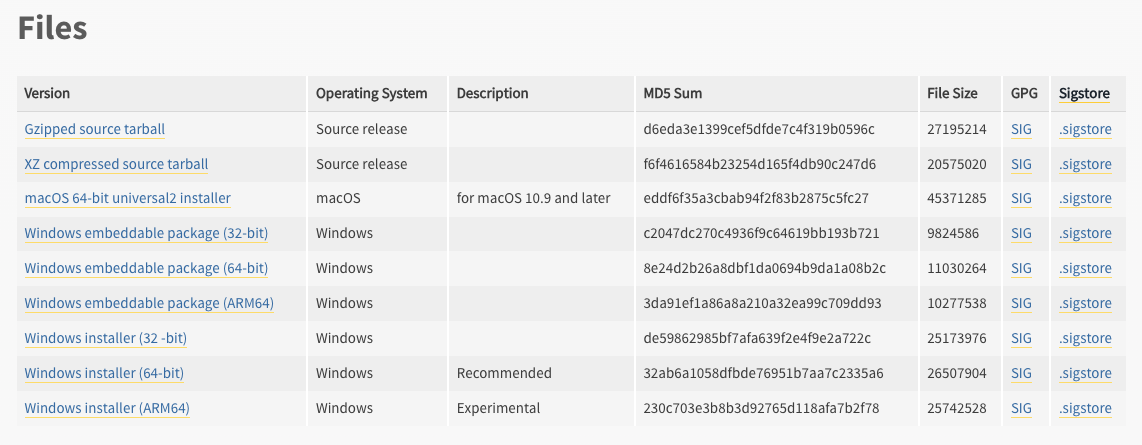
The easiest way is python.org and using the latest download for mac installer (3rd from the top here):
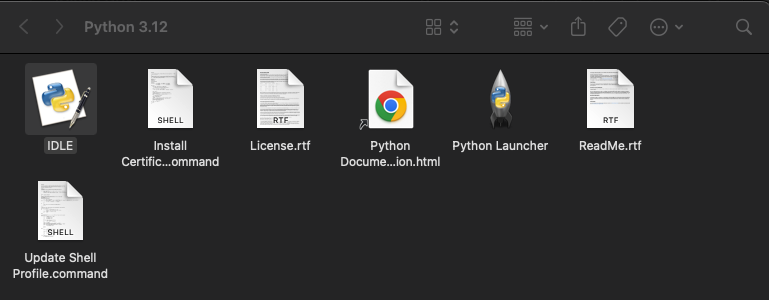
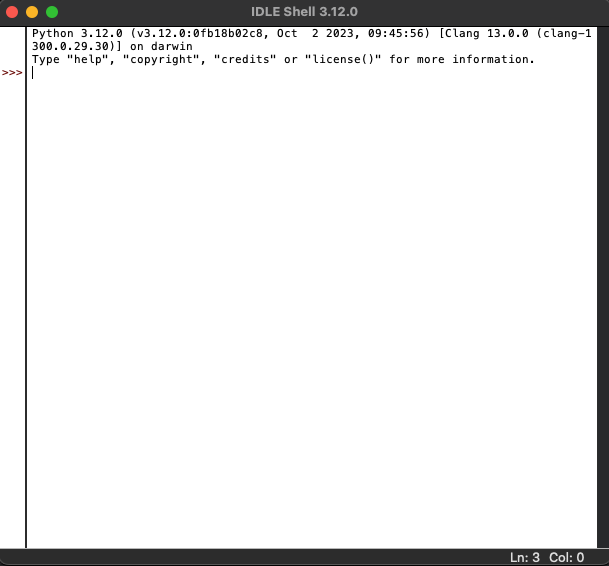
You can then use python from the terminal / command line, or you can even open up IDLE directly and start running
python immediately:
Installing On Windows
The easiest way is using python.org and using the windows installer:
Then you can either use Windows Command prompt and type python3 to start the python shell,
or you can use IDLE by navigating to your install and double-clicking:
If you want a longer breakdown, I found this online: digital ocean guide on windows and python install
Build Python From Source
This section is fun for learning and exploring especially. I am not sure how many people really build python from source and install it from source but it can be done:
Docker
This one is my preferred for any application that will be used in the cloud, containers. A very basic dockerfile, using alpine which is a slime python docker image we can use as our base:
FROM python:3.11.6-alpine
# your custom stuff

# example command
ENTRYPOINT ["python3"]
Very basic build command:
docker build -t python-example .
and then using the docker image, run it interactively:
docker run -it python-example

docker run -it python-ex
Python 3.11.6 (main, Oct 19 2023, 05:43:48) [GCC 12.2.1 20220924] on linux
Type "help", "copyright", "credits" or "license" for more information.
>>>
Why I Love Python
Python is a great programming language that encourages good code structure, simple logic, and it is very close to english, so it can be followed pretty logically. It also is a great way to get started learning programming, since you can install it for free very quickly, and begin writing code.
For me, I learned Python long after learning C and Java, both of which are much more complicated when you try to create long programs. The logic is the same, but it is much easier to write Python I think.
Python is also very versatile. You can write simple scripts for testing things like move my files around and rename them, all the way up to complex web services in the cloud that run in real time to process video and audio. All of those things can be done in any programming language, but python can be easy to write.
Don’t get me wrong, there are lots of gotchas in python, and there are lots of things to complain about the language. I have worked with it daily for years, so I would be the first to swap horror stories about bugs. However the longer I have written software, the more I believe that simple is better. It is easier to write code than read it, so you should write code that is about half as clever as you are yourself :)
Python can create simple code that is easy to update and re-use, and most importantly, it is fast to write and easy to run locally. You can do data science, web services, configuration updates, web scraping, and many more useful things with python libraries off the shelf or provided by the active community.
Now that you have Python installed and are ready to use it, you can basically build ANYTHING you want, if you take the time to learn how. Good luck.
- Jared